

When working with Laravel APIs, one of the most common tasks for developers and QA teams is testing endpoints in Postman. Manually creating Postman collections can be time-consuming, especially as your application grows. Luckily, the yasintqvi/laravel-postman package makes it simple to automatically generate Postman Collections directly from your Laravel routes.
In this article, we’ll walk through how to install, configure, and generate Postman collections using this powerful package.
Why Use Postman Collections for Laravel APIs?
Postman Collections are essential for:
- Testing REST APIs efficiently
- Sharing API documentation with your team
- Automating API workflows for development and QA
- Keeping API requests updated as routes change
Instead of manually exporting requests to Postman, this package lets Laravel do the work for you.
Step 1: Install the Package
First, install the package using Composer:
composer require --dev yasintqvi/laravel-postmanStep 2: Publish the Configuration File
After installation, publish the package configuration:
php artisan vendor:publish --provider="YasinTgh\LaravelPostman\PostmanServiceProvider" --tag="postman-config"This will create a config file at
config/postman.php.
Step 3: Configure Your API Collection
This package provides flexible configuration options, including route filtering, API authentication setup, file generation paths, custom filenames, and more.
Inside the config file, you can set the collection name, API base URL, and other details if you want:
<?php

return [
    /*
    |--------------------------------------------------------------------------
    | API Basic Configuration
    |--------------------------------------------------------------------------
    |
    | Core settings for the API documentation
    |
    */
    'name' => env('APP_NAME', 'Laravel API'),
    'description' => env('API_DESCRIPTION', 'API Documentation'),
    'base_url' => env('APP_URL', 'http://localhost'),

    /*
    |--------------------------------------------------------------------------
    | Route Filtering Configuration
    |--------------------------------------------------------------------------
    |
    | Define which routes should be included/excluded from documentation
    |
    */
    'routes' => [
        // Base prefix for API routes (e.g. 'api' for routes like 'api/users')
        'prefix' => 'api',

        // Routes to explicitly include
        'include' => [
            // URI patterns to include (supports wildcards)
            'patterns' => [],

            // Only routes with these middleware
            'middleware' => [],

            // Only routes from these controllers
            'controllers' => [],
        ],

        // Routes to explicitly exclude
        'exclude' => [
            // URI patterns to exclude (supports wildcards)
            'patterns' => [],

            // Exclude routes with these middleware
            'middleware' => [],

            // Exclude routes from these controllers
            'controllers' => [],
        ],
    ],

    /*
    |--------------------------------------------------------------------------
    | Documentation Structure
    |--------------------------------------------------------------------------
    |
    | How the documentation should be organized in Postman
    |
    */
    'structure' => [
        'folders' => [
            // Grouping strategy: 'prefix', 'nested_path', 'controller'
            'strategy' => 'nested_path',
            'max_depth' => 3, //  when strategy is nested_path

            // Custom name mapping for folders
            'mapping' => [
                // Example: 'admin' => 'Administration'
            ],
        ],

        /**
         * Postman request naming format.
         * Placeholders: {method}, {uri}, {controller}, {action}
         * Example: '[POST] /users' or 'UserController@store'
         */
        'naming_format' => '[{method}] {uri}',

        /**
         * Body generation rules
         * Determines the default format for request bodies in Postman documentation.
         * Supported: 'raw', 'formdata'
         */
        'requests' => [
            'default_body_type' => 'raw',
        ]
    ],

    /*
    |--------------------------------------------------------------------------
    | Authentication Configuration
    |--------------------------------------------------------------------------
    |
    | Settings for API authentication documentation and examples
    |
    | Determines how authentication is handled in the generated documentation,
    | including auth type detection, protected route identification, and
    | example values for documentation purposes.
    |
    */
    'auth' => [
        // Enable authentication documentation
        'enabled' => false,

        // Supported: 'bearer', 'basic', 'api_key'
        'type' => 'bearer',

        // Where to send the auth: 'header' or 'query'
        'location' => 'header',

        // Default values (use env vars for real values)
        'default' => [
            'token' => 'your-access-token',       // For bearer auth
            'username' => 'user@example.com',      // For basic auth
            'password' => 'password',              // For basic auth
            'key_name' => 'X-API-KEY',             // For api_key auth
            'key_value' => 'your-api-key-here',    // For api_key auth
        ],

        // Middleware that indicate protected routes
        'protected_middleware' => ['auth:api'],
    ],

    /*
    |--------------------------------------------------------------------------
    | Default Headers
    |--------------------------------------------------------------------------
    |
    | Headers to include with every request
    |
    */
    'headers' => [
        'Accept' => 'application/json',
        'Content-Type' => 'application/json',
    ],

    /*
    |--------------------------------------------------------------------------
    | Output Configuration
    |--------------------------------------------------------------------------
    |
    | Where and how to save the generated documentation
    |
    */
    'output' => [
        // Storage path for generated files
        'path' => storage_path('postman'),

        // File naming pattern (date will be appended)
        'filename' => 'api_collection',
    ],
];
Step 4: Generate the Postman Collection
To generate the collection, run:
php artisan postman:generateThis will create a
api_collectionfile in thestorage/app/postmandirectory. You can then import this file into Postman and instantly have all your Laravel routes available for testing.
Example: Generating Postman Collection for Laravel API
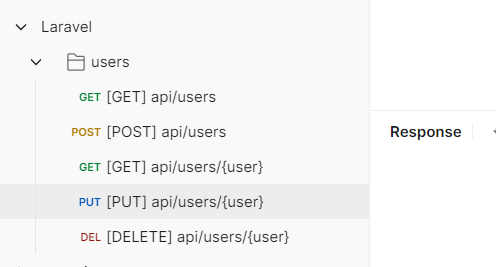
Let’s say your Laravel API project has the following route defined in routes/api.php:
<?php

use App\Http\Controllers\UserController;
use Illuminate\Support\Facades\Route;

Route::resource('users', UserController::class);
After running:
php artisan postman:generateThis will create a api_collection file in the storage/app/postman directory. You can then import this file into Postman and instantly have all your Laravel routes available for testing.
Conclusion
If you’re building APIs with Laravel, the yasintqvi/laravel-postman package can save you hours of manual work. It keeps your Postman collections automatically updated with your Laravel routes, making API testing, debugging, and documentation easier than ever.
Check out the package on GitHub and start generating Postman collections for your Laravel APIs.
If you found this helpful, feel free to share or drop a comment. Happy coding with Laravel!
Free resources for this topic
Code snippets and fixes for this topic
Get one practical tip every week
New tutorials, fixes and free cheat sheets from DEV Talk, straight to your inbox. No spam, unsubscribe in one click.
Free download: Laravel interview questions (PDF)
Have a question about this post?
Ask the community: other developers and the author can answer.
Get notified about new articles
One click, no email needed. Turn it off anytime with the bell at the top.
Get new articles on your iPhone
Add DEV Talk to your Home Screen, open it, then tap the bell.
Enjoying the content?
If this article helped you, you can support the author with a coffee. It keeps new posts coming.


Comments 0
No comments yet
Be the first to share your thoughts.